



Even though I have the password for a user with the DV_ACCTMGR role this cannot be used to change the DVO password. Only the DVO can change their own password as DV protects itself by not allowing the password of the owner to be changed except by the owner and not even by the ACCTMGR user.
This behaviour is intentional from Oracle to make it very hard to disable DV if you do not have access to a DV OWNER.
So, if we have got in this state - we forgot the DV OWNER password then what can we do?
Oracle states that it cannot be recovered or fixed. It suggests that we "find" the password in external password vaults, pieces of paper, in files lying around or indeed any way you might find a file; alternately Oracle also suggests checking for other users with the DV_OWNER role to instead use them.
Alternately I have read that Oracle may be able to help customers via an SR in this case. I also read (with no proof) that Oracle are able to set events during the boot process so that between MOUNT and OPEN and after the bootstrap and dictionary loaded so that DV can be disabled without the DV ONWER password. I have no idea if this is true or not as I cannot find anything on Google.
Lets explore some of the ideas on the internet. Someone suggested that a STARTUP UPGRADE could bypass DV and allow the DVO password to be changed or DV to be disabled:
root@192.168.56.33's password:
Last login: Tue May 26 07:32:23 2026 from 192.168.56.1
[root@ol21cxe ~]# su - oracle
Last login: Tue May 26 07:32:36 BST 2026 on pts/1
[oracle@ol21cxe ~]$ source /opt/oracle/product/21c/dbhomeXE/bin/oraenv
ORACLE_SID = [oracle] ? XE
The Oracle base has been set to /opt/oracle
[oracle@ol21cxe ~]$ sqlplus / as sysdba

SQL*Plus: Release 21.0.0.0.0 - Production on Wed May 27 13:36:11 2026
Version 21.3.0.0.0

Copyright (c) 1982, 2021, Oracle.  All rights reserved.


Connected to:
Oracle Database 21c Express Edition Release 21.0.0.0.0 - Production
Version 21.3.0.0.0

SQL> shutdown immediate
Database closed.
Database dismounted.
ORACLE instance shut down.
SQL> startup upgrade
ORACLE instance started.

Total System Global Area 1157625952 bytes
Fixed Size                  9685088 bytes
Variable Size             905969664 bytes
Database Buffers          234881024 bytes
Redo Buffers                7090176 bytes
Database mounted.
Database opened.
SQL> exec dbms_macadm.disable_dv;
BEGIN dbms_macadm.disable_dv; END;

      *
ERROR at line 1:
ORA-06550: line 1, column 7:
PLS-00904: insufficient privilege to access object DVSYS.DBMS_MACADM
ORA-06550: line 1, column 7:
PL/SQL: Statement ignored


SQL> grant execute on dvsys.dbms_macadm to sys;

grant execute on dvsys.dbms_macadm to sys
                       *
ERROR at line 1:
ORA-47401: Realm violation for GRANT on DVSYS.DBMS_MACADM


SQL> alter user c##dvo identified by oracle1;
alter user c##dvo identified by oracle1
*
ERROR at line 1:
ORA-01031: insufficient privileges


SQL>
So, no, that idea does not work. Another idea on the internet is to shutdown the database and unlink DV in the binaries. Let us try that:
SQL> shutdown immediate
Database closed.
Database dismounted.
ORACLE instance shut down.
SQL> exit
Disconnected from Oracle Database 21c Express Edition Release 21.0.0.0.0 - Production
Version 21.3.0.0.0
[oracle@ol21cxe ~]$ cd $ORACLE_HOME/rdbms/lib
[oracle@ol21cxe lib]$ make -f ins_rdbms.mk dv_off ioracle
dv_off has been deprecated
chmod 755 /opt/oracle/product/21c/dbhomeXE/bin
/usr/bin/ar: creating /opt/oracle/product/21c/dbhomeXE/lib/libserver.a

 - Linking Oracle
rm -f /opt/oracle/product/21c/dbhomeXE/rdbms/lib/oracle
rm -f /opt/oracle/product/21c/dbhomeXE/rdbms/lib/oracle.map;      /opt/oracle/product/21c/dbhomeXE/bin/orald  -o /opt/oracle/product/21c/dbhomeXE/rdbms/lib/oracle -m64 -z noexecstack -Wl,--disable-new-dtags   -L/opt/oracle/product/21c/dbhomeXE/rdbms/lib/ -L/opt/oracle/product/21c/dbhomeXE/lib/ -L/opt/oracle/product/21c/dbhomeXE/lib/stubs/  -Wl,-Map,/opt/oracle/product/21c/dbhomeXE/rdbms/lib/oracle.map -Wl,-E /opt/oracle/product/21c/dbhomeXE/rdbms/lib/opimai.o /opt/oracle/product/21c/dbhomeXE/rdbms/lib/ssoraed.o /opt/oracle/product/21c/dbhomeXE/rdbms/lib/ttcsoi.o -Wl,--whole-archive -lperfsrv -Wl,--no-whole-archive /opt/oracle/product/21c/dbhomeXE/lib/nautab.o /opt/oracle/product/21c/dbhomeXE/lib/naeet.o /opt/oracle/product/21c/dbhomeXE/lib/naect.o /opt/oracle/product/21c/dbhomeXE/lib/naedhs.o /opt/oracle/product/21c/dbhomeXE/rdbms/lib/config.o  -ldmext -lserver -loraodm -lofs -lcellst -lnnet -lskgxp -lsnls -lnls  -lcore -lsnls -lnls -lcore -lsnls -lnls -lxml -lcore -lunls -lsnls -lnls -lcore -lnls -lclient  -lvsnst -lcommon -lgeneric -lknlopt -loraolap -lskjcx -lslax -lpls  -lrt -lplp -ldmext -lserver -lclient  -lvsnst -lcommon -lgeneric `if [ -f /opt/oracle/product/21c/dbhomeXE/lib/libavserver.a ] ; then echo "-lavserver" ; else echo "-lavstub"; fi` `if [ -f /opt/oracle/product/21c/dbhomeXE/lib/libavclient.a ] ; then echo "-lavclient" ; fi` -lknlopt -lslax -lpls  -lrt -lplp -ljavavm -lserver  -lwwg  `cat /opt/oracle/product/21c/dbhomeXE/lib/ldflags`    -lncrypt -lnsgr -ln -lnl -lngsmshd -lnro `cat /opt/oracle/product/21c/dbhomeXE/lib/ldflags`    -lncrypt -lnsgr -ln -lnl -lngsmshd -lnnzst -lzt -lztkg -lmm -lsnls -lnls  -lcore -lsnls -lnls -lcore -lsnls -lnls -lxml -lcore -lunls -lsnls -lnls -lcore -lnls -lztkg `cat /opt/oracle/product/21c/dbhomeXE/lib/ldflags`    -lncrypt -lnsgr -ln -lnl -lngsmshd -lnro `cat /opt/oracle/product/21c/dbhomeXE/lib/ldflags`    -lncrypt -lnsgr -ln -lnl -lngsmshd -lnnzst -lzt -lztkg   -lsnls -lnls  -lcore -lsnls -lnls -lcore -lsnls -lnls -lxml -lcore -lunls -lsnls -lnls -lcore -lnls `if  /usr/bin/ar tv /opt/oracle/product/21c/dbhomeXE/rdbms/lib/libknlopt.a | grep "kxmnsd.o" > /dev/null 2>&1 ; then echo " " ; else echo "-lordsdo -lserver"; fi` -L/opt/oracle/product/21c/dbhomeXE/lib/ -lctxc -lctx -lzx -lgx -lctx -lzx -lgx -lclscest -loevm -lclsra -ldbcfg -lhasgen  -lnnzst -lzt -lxml -lgeneric -locr -locrb -locrutl -lhasgen  -lnnzst -lzt -lxml -lgeneric  -lgeneric -lorazip -loraz -llzopro5 -lorabz2 -lorazstd -loralz4 -lipp_z -lipp_bz2 -lippdc -lipps -lippcore  -lippcp -lsnls -lnls  -lcore -lsnls -lnls -lcore -lsnls -lnls -lxml -lcore -lunls -lsnls -lnls -lcore -lnls -lsnls -lunls -llxled  -lsnls -lnls  -lcore -lsnls -lnls -lcore -lsnls -lnls -lxml -lcore -lunls -lsnls -lnls -lcore -lnls -lasmclnt -lcommon -lcore  -ledtn -laio -lons  -lmql1 -lipc1  -lmql1 -lipc1 -lfthread    `cat /opt/oracle/product/21c/dbhomeXE/lib/sysliblist` -Wl,-rpath,/opt/oracle/product/21c/dbhomeXE/lib -lm    `cat /opt/oracle/product/21c/dbhomeXE/lib/sysliblist` -ldl -lm   -L/opt/oracle/product/21c/dbhomeXE/lib `test -x /usr/bin/hugeedit -a -r /usr/lib64/libhugetlbfs.so && test -r /opt/oracle/product/21c/dbhomeXE/rdbms/lib/shugetlbfs.o && echo -Wl,-zcommon-page-size=2097152 -Wl,-zmax-page-size=2097152 -lhugetlbfs`
/usr/bin/ar: /opt/oracle/product/21c/dbhomeXE/rdbms/lib/libknlopt.a: No such file or directory
/usr/bin/ld: cannot find /opt/oracle/product/21c/dbhomeXE/lib/crtbegin.o: No such file or directory
/usr/bin/ld: cannot find /opt/oracle/product/21c/dbhomeXE/rdbms/lib/opimai.o: No such file or directory
/usr/bin/ld: cannot find /opt/oracle/product/21c/dbhomeXE/rdbms/lib/ssoraed.o: No such file or directory
/usr/bin/ld: cannot find /opt/oracle/product/21c/dbhomeXE/rdbms/lib/ttcsoi.o: No such file or directory
/usr/bin/ld: cannot find -lperfsrv
/usr/bin/ld: cannot find /opt/oracle/product/21c/dbhomeXE/lib/nautab.o: No such file or directory
/usr/bin/ld: cannot find /opt/oracle/product/21c/dbhomeXE/lib/naeet.o: No such file or directory
/usr/bin/ld: cannot find /opt/oracle/product/21c/dbhomeXE/lib/naect.o: No such file or directory
/usr/bin/ld: cannot find /opt/oracle/product/21c/dbhomeXE/lib/naedhs.o: No such file or directory
/usr/bin/ld: cannot find -ldmext
/usr/bin/ld: cannot find -loraodm
/usr/bin/ld: cannot find -lcellst
/usr/bin/ld: cannot find -lnnet
/usr/bin/ld: cannot find -lsnls
/usr/bin/ld: cannot find -lsnls
/usr/bin/ld: cannot find -lsnls
/usr/bin/ld: cannot find -lsnls
/usr/bin/ld: cannot find -lclient
/usr/bin/ld: cannot find -lvsnst
/usr/bin/ld: cannot find -lcommon
/usr/bin/ld: cannot find -lgeneric
/usr/bin/ld: cannot find -lknlopt
/usr/bin/ld: cannot find -loraolap
/usr/bin/ld: cannot find -lslax
/usr/bin/ld: cannot find -lpls
/usr/bin/ld: cannot find -lplp
/usr/bin/ld: cannot find -ldmext
/usr/bin/ld: cannot find -lclient
/usr/bin/ld: cannot find -lvsnst
/usr/bin/ld: cannot find -lcommon
/usr/bin/ld: cannot find -lgeneric
/usr/bin/ld: cannot find -lavstub
/usr/bin/ld: cannot find -lknlopt
/usr/bin/ld: cannot find -lslax
/usr/bin/ld: cannot find -lpls
/usr/bin/ld: cannot find -lplp
/usr/bin/ld: cannot find -ljavavm
/usr/bin/ld: cannot find -lwwg
/usr/bin/ld: cannot find -lnbeq
/usr/bin/ld: cannot find -lntmq
/usr/bin/ld: cannot find -lnhost
/usr/bin/ld: cannot find -lnus
/usr/bin/ld: cannot find -lnldap
/usr/bin/ld: cannot find -lldapclnt
/usr/bin/ld: cannot find -lngsmshd
/usr/bin/ld: cannot find -lntcp
/usr/bin/ld: cannot find -lntcps
/usr/bin/ld: cannot find -lntcp
/usr/bin/ld: cannot find -lntns
/usr/bin/ld: cannot find -lntwss
/usr/bin/ld: cannot find -lncrypt
/usr/bin/ld: cannot find -lnsgr
/usr/bin/ld: cannot find -ln
/usr/bin/ld: cannot find -lnl
/usr/bin/ld: cannot find -lngsmshd
/usr/bin/ld: cannot find -lnro
/usr/bin/ld: cannot find -lnbeq
/usr/bin/ld: cannot find -lntmq
/usr/bin/ld: cannot find -lnhost
/usr/bin/ld: cannot find -lnus
/usr/bin/ld: cannot find -lnldap
/usr/bin/ld: cannot find -lldapclnt
/usr/bin/ld: cannot find -lngsmshd
/usr/bin/ld: cannot find -lntcp
/usr/bin/ld: cannot find -lntcps
/usr/bin/ld: cannot find -lntcp
/usr/bin/ld: cannot find -lntns
/usr/bin/ld: cannot find -lntwss
/usr/bin/ld: cannot find -lncrypt
/usr/bin/ld: cannot find -lnsgr
/usr/bin/ld: cannot find -ln
/usr/bin/ld: cannot find -lnl
/usr/bin/ld: cannot find -lngsmshd
/usr/bin/ld: cannot find -lnnzst
/usr/bin/ld: cannot find -lzt
/usr/bin/ld: cannot find -lztkg
/usr/bin/ld: cannot find -lmm
/usr/bin/ld: cannot find -lsnls
/usr/bin/ld: cannot find -lsnls
/usr/bin/ld: cannot find -lsnls
/usr/bin/ld: cannot find -lsnls
/usr/bin/ld: cannot find -lztkg
/usr/bin/ld: cannot find -lnbeq
/usr/bin/ld: cannot find -lntmq
/usr/bin/ld: cannot find -lnhost
/usr/bin/ld: cannot find -lnus
/usr/bin/ld: cannot find -lnldap
/usr/bin/ld: cannot find -lldapclnt
/usr/bin/ld: cannot find -lngsmshd
/usr/bin/ld: cannot find -lntcp
/usr/bin/ld: cannot find -lntcps
/usr/bin/ld: cannot find -lntcp
/usr/bin/ld: cannot find -lntns
/usr/bin/ld: cannot find -lntwss
/usr/bin/ld: cannot find -lncrypt
/usr/bin/ld: cannot find -lnsgr
/usr/bin/ld: cannot find -ln
/usr/bin/ld: cannot find -lnl
/usr/bin/ld: cannot find -lngsmshd
/usr/bin/ld: cannot find -lnro
/usr/bin/ld: cannot find -lnbeq
/usr/bin/ld: cannot find -lntmq
/usr/bin/ld: cannot find -lnhost
/usr/bin/ld: cannot find -lnus
/usr/bin/ld: cannot find -lnldap
/usr/bin/ld: cannot find -lldapclnt
/usr/bin/ld: cannot find -lngsmshd
/usr/bin/ld: cannot find -lntcp
/usr/bin/ld: cannot find -lntcps
/usr/bin/ld: cannot find -lntcp
/usr/bin/ld: cannot find -lntns
/usr/bin/ld: cannot find -lntwss
/usr/bin/ld: cannot find -lncrypt
/usr/bin/ld: cannot find -lnsgr
/usr/bin/ld: cannot find -ln
/usr/bin/ld: cannot find -lnl
/usr/bin/ld: cannot find -lngsmshd
/usr/bin/ld: cannot find -lnnzst
/usr/bin/ld: cannot find -lzt
/usr/bin/ld: cannot find -lztkg
/usr/bin/ld: cannot find -lsnls
/usr/bin/ld: cannot find -lsnls
/usr/bin/ld: cannot find -lsnls
/usr/bin/ld: cannot find -lsnls
/usr/bin/ld: cannot find -lordsdo
/usr/bin/ld: cannot find -lctxc
/usr/bin/ld: cannot find -lctx
/usr/bin/ld: cannot find -lzx
/usr/bin/ld: cannot find -lgx
/usr/bin/ld: cannot find -lctx
/usr/bin/ld: cannot find -lzx
/usr/bin/ld: cannot find -lgx
/usr/bin/ld: cannot find -lclscest
/usr/bin/ld: cannot find -lnnzst
/usr/bin/ld: cannot find -lzt
/usr/bin/ld: cannot find -lgeneric
/usr/bin/ld: cannot find -lnnzst
/usr/bin/ld: cannot find -lzt
/usr/bin/ld: cannot find -lgeneric
/usr/bin/ld: cannot find -lgeneric
/usr/bin/ld: cannot find -lorazip
/usr/bin/ld: cannot find -loraz
/usr/bin/ld: cannot find -llzopro5
/usr/bin/ld: cannot find -lorabz2
/usr/bin/ld: cannot find -lorazstd
/usr/bin/ld: cannot find -loralz4
/usr/bin/ld: cannot find -lipp_z
/usr/bin/ld: cannot find -lipp_bz2
/usr/bin/ld: cannot find -lippdc
/usr/bin/ld: cannot find -lipps
/usr/bin/ld: cannot find -lippcore
/usr/bin/ld: cannot find -lippcp
/usr/bin/ld: cannot find -lsnls
/usr/bin/ld: cannot find -lsnls
/usr/bin/ld: cannot find -lsnls
/usr/bin/ld: cannot find -lsnls
/usr/bin/ld: cannot find -lsnls
/usr/bin/ld: cannot find -llxled
/usr/bin/ld: cannot find -lsnls
/usr/bin/ld: cannot find -lsnls
/usr/bin/ld: cannot find -lsnls
/usr/bin/ld: cannot find -lsnls
/usr/bin/ld: cannot find -lasmclnt
/usr/bin/ld: cannot find -lcommon
/usr/bin/ld: cannot find -ledtn
/usr/bin/ld: cannot find -lfthread
make: *** [/opt/oracle/product/21c/dbhomeXE/rdbms/lib/oracle] Error 1
That does not work either as the line "dv_off has been deprecated" shows that you cannot unlink the software anymore to disable DV. Another idea suggested by someone was to create a "pfile"; set the parameter enable_dv=false and then open the database. No one else suggested this but let us try for completeness:
SQL> create pfile='/tmp/initxe.ora' from spfile;

File created.

SQL> shutdown immediate
Database closed.
Database dismounted.
ORACLE instance shut down.
SQL>
SQL> exit
[oracle@ol21cxe lib]$ cat /tmp/initxe.ora
XE.__data_transfer_cache_size=0
XE.__db_cache_size=167772160
XE.__inmemory_ext_roarea=0
XE.__inmemory_ext_rwarea=0
XE.__java_pool_size=184549376
XE.__large_pool_size=16777216
XE.__oracle_base='/opt/oracle'#ORACLE_BASE set from environment
XE.__pga_aggregate_target=385875968
XE.__sga_target=1157627904
XE.__shared_io_pool_size=67108864
XE.__shared_pool_size=671088640
XE.__streams_pool_size=33554432
XE.__unified_pga_pool_size=0
*.audit_file_dest='/opt/oracle/admin/XE/adump'
*.audit_trail='db'
*.compatible='21.0.0'
*.control_files='/opt/oracle/oradata/XE/control01.ctl','/opt/oracle/oradata/XE/control02.ctl'
*.db_block_size=8192
*.db_name='XE'
*.diagnostic_dest='/opt/oracle'
*.dispatchers='(PROTOCOL=TCP) (SERVICE=XEXDB)'
*.enable_pluggable_database=true
*.local_listener='LISTENER_XE'
*.nls_language='ENGLISH'
*.nls_territory='UNITED KINGDOM'
*.open_cursors=300
*.permit_92_wrap_format=TRUE
*.pga_aggregate_target=364m
*.processes=300
*.remote_login_passwordfile='EXCLUSIVE'
*.sga_target=1093m
*.undo_tablespace='UNDOTBS1'
*.enable_dv=false
[oracle@ol21cxe lib]$ sqlplus / as sysdba

SQL> startup pfile='/tmp/initxe.ora';
LRM-00101: unknown parameter name 'enable_dv'
ORA-01078: failure in processing system parameters
SQL>
I knew this would not work as no other sites suggested it. A quick check in the database shows this parameter does not exist and also a detailed check of all parameters including hidden underscore ones and none relate to disabling DV.
Are there any other DV_ONWER users that we may know the password of:
SQL> col grantee for a30
SQL> col granted_role for a30

SQL> select grantee, granted_role, common from dba_role_privs where granted_role in ('DV_OWNER','DV_ACCTMGR');

GRANTEE                        GRANTED_ROLE                   COM
------------------------------ ------------------------------ ---
C##ACCO                        DV_ACCTMGR                     NO
C##ACCO_BK                     DV_ACCTMGR                     NO
C##DVO_BK                      DV_OWNER                       NO
C##DVO                         DV_OWNER                       NO
C##ACCO_BK                     DV_ACCTMGR                     YES
C##DVO_BK                      DV_OWNER                       YES

6 rows selected.

SQL>
The backup users have the roles granted COMMON and each user also has the roles granted locally (backup and non backup) so if we knew the password of C##DVO_BK then we could get in with that and disable DV and then change the C##DVO password to a known value.
Can a user with DV_ACCTMGR change the password of a user with DV_OWNER?
SQL> connect c##acco/oracle1@//192.168.56.33:1539/xe
Connected.
SQL> alter user c##dvo identified by oracle1;
alter user c##dvo identified by oracle1
*
ERROR at line 1:
ORA-01031: insufficient privileges


SQL> alter user c##dvo_bk identified by oracle1;
alter user c##dvo_bk identified by oracle1
*
ERROR at line 1:
ORA-01031: insufficient privileges


SQL>
Only DV_OWNER can change their own password, they cannot change the password of another user with DV_OWNER. DV_ACCTMGR can change other passwords in the database though but a user with DV_OWNER cannot change the password of a user with DV_ACCTMGR:
SQL> connect c##dvo_bk/oracle1@//192.168.56.33:1539/xe
Connected.
SQL> alter user c##dvo identified by oracle1;
alter user c##dvo identified by oracle1
*
ERROR at line 1:
ORA-01031: insufficient privileges


SQL>
only DVO can change his own password. BTW, other users can still change their own passwords even with password restrictions out of the box OOTB in DV
SQL> alter user c##dvo identified by oracle1;

User altered.

SQL>
Of course I have not really forgotten the C##DVO password I am just pretending I have for testing, hence i can demonstrate re-setting the DV_OWNER password above.
Let us see if we generate the password hash of a know password from another database can we re-apply it to our database when the password is not known:
SQL> connect sys/oracle1@//192.168.56.33:1539/xe as sysdba
Connected.
SQL> set long 1000000
SQL> select dbms_metadata.get_ddl('USER','C##DVO') from dual;

DBMS_METADATA.GET_DDL('USER','C##DVO')
--------------------------------------------------------------------------------

   CREATE USER "C##DVO" IDENTIFIED BY VALUES 'S:680448D96099E877FE4A3A5938001775
D8284A41ACA3732A67B45193E287;T:40B680A3A8453A1F0AAC83EAA3FB8D05764C155527B3B8A21
FDB01E9F18F9FE868CF3BBBC4246205F09E66B0B6062CB22402614CC106A83118206BB784C09BFFF
AD97B9689B57687666E0DFA2332CF75'
      DEFAULT TABLESPACE "USERS"
      TEMPORARY TABLESPACE "TEMP"


SQL>
One method that would work to recover the password providing its short enough or a dictionary password is to crack it:
SQL> sho user
USER is "SYS"
SQL> grant select on sys.user$ to system;

Grant succeeded.

SQL> connect system/oracle1@//192.168.56.33:1539/xe
ERROR:
ORA-28002: the password will expire within 7 days


Connected.
SQL> alter user system identified by oracle1;

User altered.

SQL>
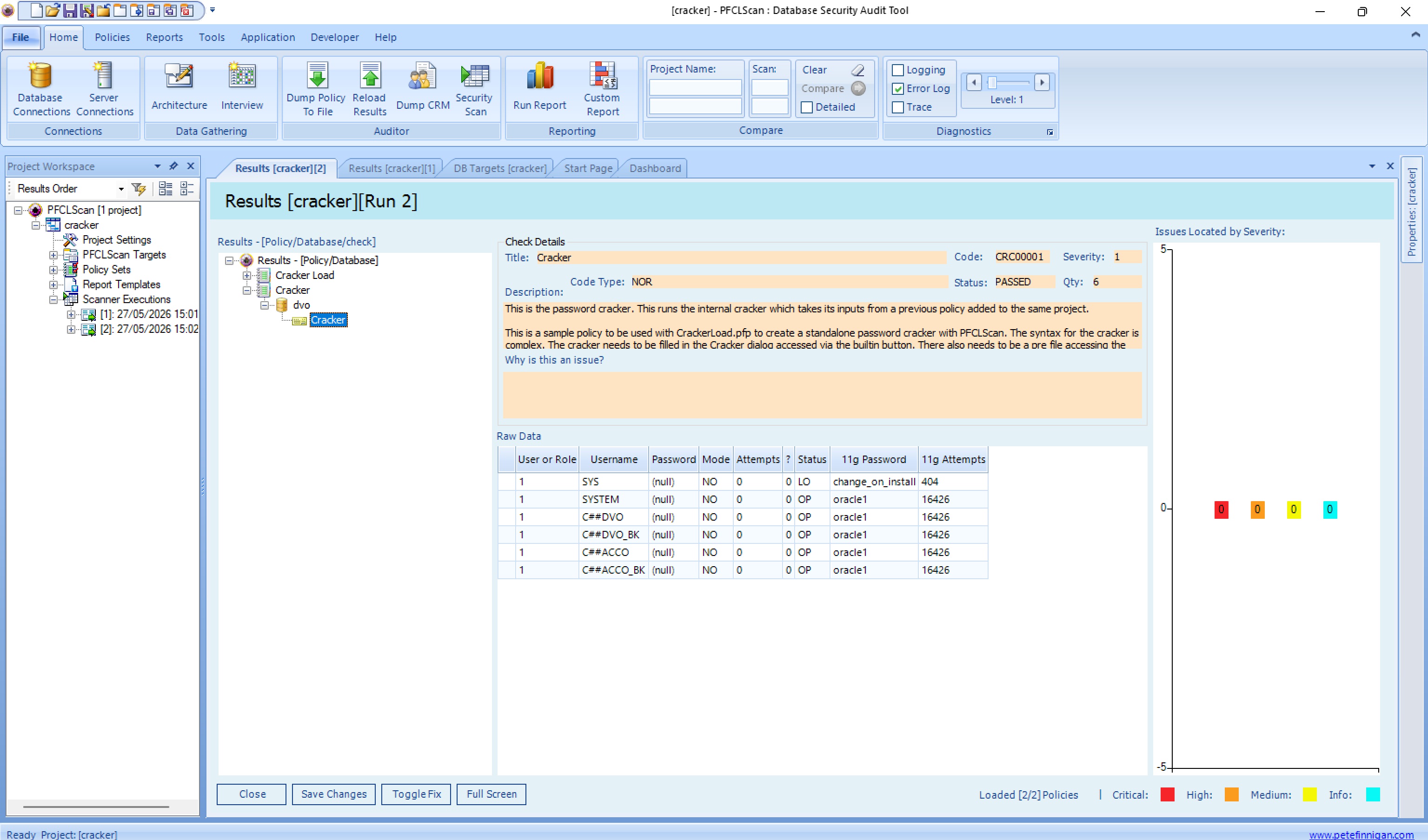
Let us try another method. We can attempt to update SYS.USER$ directly with SQL. This is not supported and is only for research and entertainment:
SQL> connect sys/oracle1@//192.168.56.33:1539/xe as sysdba
Connected.
SQL> update sys.user$ set spare4='S:680448D96099E877FE4A3A5938001775
  2  D8284A41ACA3732A67B45193E287;T:40B680A3A8453A1F0AAC83EAA3FB8D05764C155527B3B8A21
  3  FDB01E9F18F9FE868CF3BBBC4246205F09E66B0B6062CB22402614CC106A83118206BB784C09BFFF
  4  AD97B9689B57687666E0DFA2332CF75' where name='C##DVO';
update sys.user$ set spare4='S:680448D96099E877FE4A3A5938001775
           *
ERROR at line 1:
ORA-01031: insufficient privileges


SQL>
Did not work, can we use ALTER USER identified by values:
SQL> connect sys/oracle1@//192.168.56.33:1539/xe as sysdba
Connected.
SQL> alter user c##dvo identified by values 'S:680448D96099E877FE4A3A5938001775
  2  D8284A41ACA3732A67B45193E287;T:40B680A3A8453A1F0AAC83EAA3FB8D05764C155527B3B8A21
  3  FDB01E9F18F9FE868CF3BBBC4246205F09E66B0B6062CB22402614CC106A83118206BB784C09BFFF
  4  AD97B9689B57687666E0DFA2332CF75';
alter user c##dvo identified by values 'S:680448D96099E877FE4A3A5938001775
*
ERROR at line 1:
ORA-01031: insufficient privileges


SQL>
What about STARTUP MIGRATE?
SQL> shutdown immediate
Database closed.
Database dismounted.
ORACLE instance shut down.
SQL> startup migrate
ORACLE instance started.

Total System Global Area 1157625952 bytes
Fixed Size                  9685088 bytes
Variable Size             905969664 bytes
Database Buffers          234881024 bytes
Redo Buffers                7090176 bytes
Database mounted.
Database opened.
SQL> sho parameter cluster_database

NAME                                 TYPE        VALUE
------------------------------------ ----------- ------------------------------
cluster_database                     boolean     FALSE
SQL> alter user c##dvo identified by oracle1;
alter user c##dvo identified by oracle1
*
ERROR at line 1:
ORA-01031: insufficient privileges


SQL>
The only viable solution found seems to be to try and crack the password or find the password on paper, file or externally. If the password is simple and a dictionary word then cracking would work. If it is long and complex then this is likely not practical either as cracking would take a lot of resource or not be possible if the key space is too large
So, back to the beginning; someone suggested that Oracle via an SR can interrupt the boot process between STARTUP MOUNT and OPEN and after bootstrap whereby DV can be disabled. I really do not know if this is true or not; it might be otherwise Oracle would be telling customers to rebuild and potentially lose data.
There is one final method that I am not going to demo and it would not be supported. Almost 20 years ago in this blog I talked in a post How to hack SYS password without logging into the database. This post referenced papers by Miladin Modrakovic and Graham Thornton who talked about using BBED to change the SYS password in the datafile
This still makes sense to me as an unsupported solution. If the database is shutdown then DV is not protecting it. If we were able to change the C##DVO password directly in the data file and fix the CRC - checksum then this would get around the lost DVO password. Its a thought experiment of course and would not be supported by Oracle!!
#oracleace #sym_42 #oracle #security #hacking #database #vault #password #lost #cracking